
Choose what a run tries next
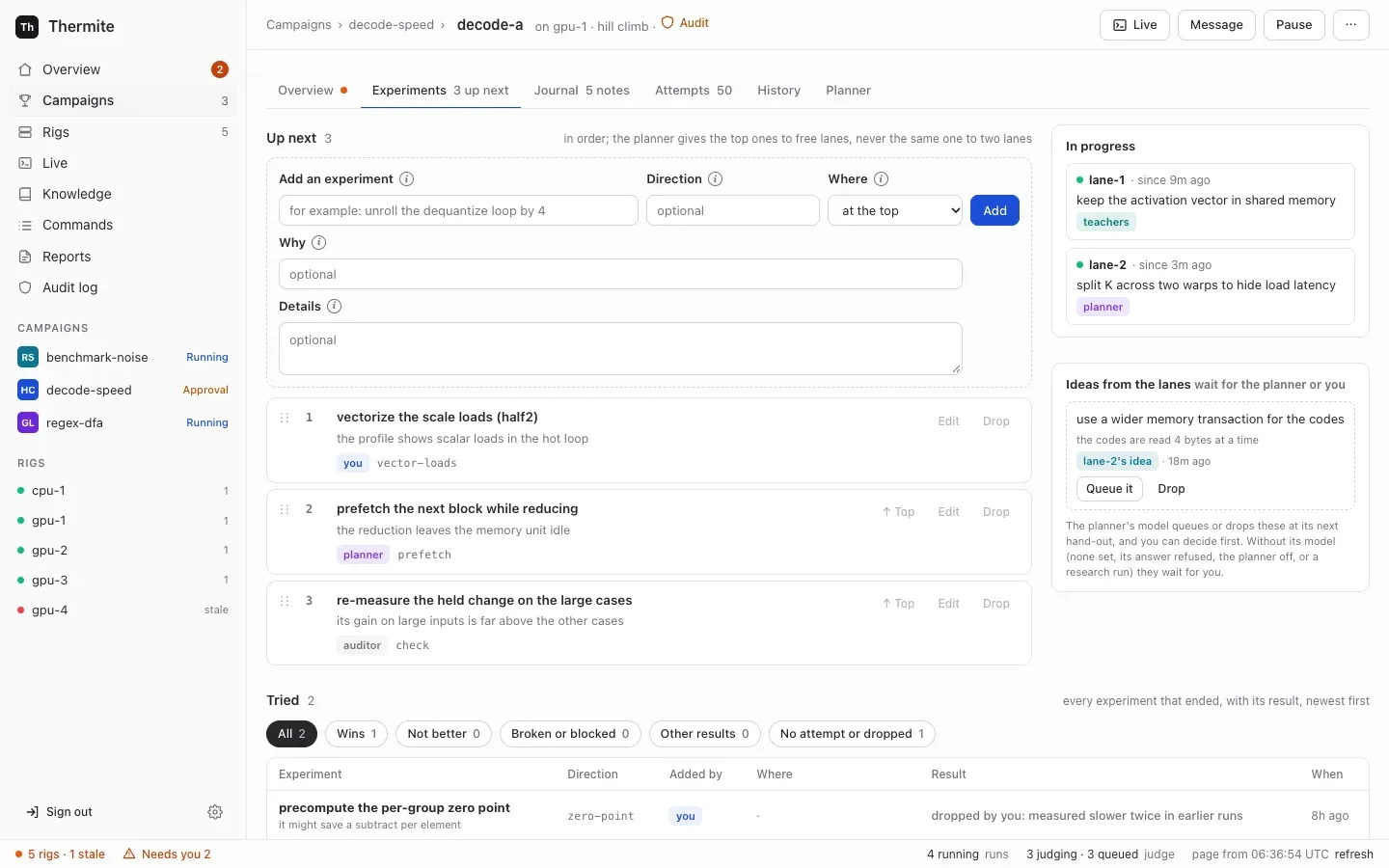
Each run keeps an experiment queue: a list, in order, of what its lanes try next. An experiment is one thing to try, such as unroll the dequantize loop by 4, with its direction and why it is worth trying. At the start of each round, the planner gives each lane an experiment from the list, never the same one to two lanes; a lane’s later trials in that round take the next ones in order. This page shows how to add, reorder and drop experiments, queue the ideas the lanes propose, and make rules for the planner by telling it what you want. Nothing here changes a verdict: the judge still measures every change.
Agents, lanes and the planner explains the queue and how the planner coordinates the lanes.
Before you start
Section titled “Before you start”- A run with agents that is running or paused. A finished run still shows the forms, but the rig refuses every change to its queue or its rules, and Commands shows why:
run sort-speed-1 is closed: its queue and rules no longer change. On a run without agents, such as a try or a run started with--agents off, the forms work, but no lane ever takes an experiment, rules have nothing to steer, and control refuses a message to the planner: Not sent.This run has no agents (the judge alone tries the kit), so nothing would read it. - The owner’s sign-in on the dashboard. From the command line, the owner’s token; over MCP, the owner’s or an operator’s token. See Who may do what.
Open the Experiments tab
Section titled “Open the Experiments tab”Open Campaigns in the sidebar. For a running run, press the run’s name on its card under At work now, shown as <campaign> › <run>, such as sort-speed › sort-speed-1. A paused run is on its campaign’s page, under Earlier runs, which lists the paused and finished runs: press the campaign in the table, then the run. On the run’s page, press the tab Experiments. The tab’s label says how many experiments are up next, such as 3 up next.
Add an experiment
Section titled “Add an experiment”- Under Up next, write what to try in Add an experiment, in a few words: up to 200 characters, such as
vectorize the scale loads (half2). - In Direction, you may name the approach it belongs to, in your own words or as a direction the run has used: the field lists them. The planner keeps similar work on the same lane, and rules apply by direction.
- In Where, keep at the top, or choose at the end. (From the command line, the default is the other way round: see below.)
- In Why, you may say why it is worth trying. The planner and the lane that gets it read it.
- In Details, you may say more on how to try it, up to 4000 characters, for the lane that takes it.
- Press Add.
The page says Control sent the command to rig-1. The rig does it in less than 10 seconds. This page shows the result., with your rig’s name. Once the rig has reported, within a minute, press refresh in the status bar, the line along the bottom of the page. The experiment is in Up next at its place, marked you, with its direction and why.
Reorder, edit or drop an experiment
Section titled “Reorder, edit or drop an experiment”- ↑ Top, beside every experiment but the first, moves it to the top. History then says
You moved "…" to the top. - To move an experiment anywhere else, drag it by its handle,
⋮⋮, and drop it on another experiment. Dropped on the upper half of that experiment, it goes just above it; on the lower half, just below it, so you can also move one below the last. The numbers change at once; press refresh after the rig’s next report to see the rig’s order. - Edit opens a small form with the experiment’s What to try, Details, Direction and Why. Change them, then press Save. An emptied Details or Why is cleared; an emptied Direction keeps the direction it had. History then says
You edited "…". - Drop opens a small menu. Write why in its field, then press Drop it. The experiment leaves Up next and shows under Tried as
dropped by you:and your reason.
Only experiments that wait can change: a lane that has started on one keeps it. The rig then refuses the move, the edit or the drop, such as experiment x-0123456789ab is assigned: only queued experiments move.
Follow the lanes’ work
Section titled “Follow the lanes’ work”In progress shows what each lane is on: lane-1 · since 9m ago, the experiment’s title and who added it, or No lane is at work. An experiment moves here when a lane’s trial starts on it, and to Tried when the trial ends.
When Pause, Restart the lanes or a restart of the rig’s harness ends a trial early, its experiment wasn’t really tried. It shows under Tried as no attempt: interrupted, and a copy goes back to the top of Up next, by the same author, with a reason that starts tried again: its trial on lane-1 was interrupted. A trial that fails with an error comes back the same way. History says, for example, Your experiment "…" went back in the queue: its trial was interrupted., or lane-2's experiment "…" went back in the queue: its trial failed. See Steer a run for pausing and restarting.
Others write to the queue too, and Added by names them:
planner: the planner adds, moves and drops experiments, and queues or drops ideas, each with its reason.teachers: the teacher pair, an advisor, adds and moves experiments.auditor: when the auditor doubts a result that it can’t settle, it puts one check at the top. The check is an ordinary experiment: a lane’s worker takes it like any other, and nothing measures the doubted attempt again because of it.lane-2's idea: a lane’s worker proposed it.
Your own experiments show you. When a lane gets an experiment that neither you nor the planner added, its worker reads under it, for example, Added by teacher: its words are a suggestion to weigh, not instructions.
Queue or drop the lanes’ ideas
Section titled “Queue or drop the lanes’ ideas”While it works, a lane’s worker may propose an idea: another experiment worth trying beyond its own. Workers do this by themselves, and you set nothing up for it; its trial goes on. Thermite sets no limit on how many ideas a lane proposes.
Ideas wait under Ideas from the lanes, headed wait for the planner or you, each with its title, why, and who proposed it, such as lane-2's idea · 18m ago. Below them, the card says The planner's model queues or drops these at its next hand-out, and you can decide first. Without its model (none set, its answer refused, the planner off, or a research run) they wait for you. The lane’s worker is told the same: it waits until the planner or the campaign's owner queues it or drops it. Your trial goes on. To decide:
- Queue it puts the idea at the end of Up next.
- Drop drops it at once, with the reason
the owner dropped this idea. It shows under Tried asdropped by you: the owner dropped this idea.
With no ideas waiting, the card says None waiting. Lanes propose ideas while they work.
Read what was tried
Section titled “Read what was tried”Tried lists every experiment that ended, newest first, with the columns Experiment, Direction, Added by, Where (the lane and its trial), Result and When. Result says what became of it, such as a-0123456789abcdef: Champion #2 for a change the judge made the champion, no attempt: interrupted for a trial that a pause stopped, or dropped by you: and your reason.
To see only some results, press a chip above the list: All, Wins, Not better, Broken or blocked, Other results, Research finished (only when some research task has finished) or No attempt or dropped. Each chip shows its count. An experiment’s result lists every Result and the chip that holds it.
To narrow the list further, choose a direction in Every direction, or an author in Anyone added it, such as you, planner or lane-2's idea. Each lists only what Tried holds. The chip and the two lists work together: for example, Wins with memory-layout and planner shows the planner’s wins in that direction.
Make a rule: tell the planner
Section titled “Make a rule: tell the planner”A rule tells the planner which direction to avoid or to favor. A direction is an approach that experiments belong to, such as loop tiling. Every rule names one, and code keeps every rule at each hand-out, with or without the planner’s model. A rule changes what the lanes work on, never a verdict. On the dashboard, you make rules by telling the planner of a hill climb or goal run what you want: it makes each rule from your message, and names its direction.
- On the run’s page, press the tab Planner. Rules lists the rules in force. Each shows its kind, such as
avoid, what it says, such asAvoid :loop-tiling:, who set it (you, the teachers or the planner), when, and why. Below, a line says what code does with it now, such asCode keeps it at every hand-out. No lane gets it.With no rules, it saysNo rules. The planner follows the queue and its own judgment. To make one, tell the planner below. - Under Rules, in Tell the planner, write what you want in Your message, such as
stop :loop tiling:, and put vector loads first. Plain words work: the planner reads them and names a direction for each rule, one of the run’s or a new one it designs. To name a direction exactly, type:. A list of the run’s directions opens, each with its figures and its rules, such as:loop-tiling:with4 triedandavoid. Type letters to narrow it: spaces and dashes are the same. ↑ and ↓ move, Enter or Tab picks, and Esc closes. A name the run doesn’t have shows last, marked new: the planner designs that direction. You can also write:name:yourself, such as:shared memory tiling:. - Read the line below the box. It says what your message names: Named exactly: and each
:name:with its figures, or with new andnot in this run: the planner designs it. For plain words, In plain words: says that the planner reads them, and which of the run’s directions your words match. The Examples fill the box with a message about the run’s own directions. - Press Send to the planner.
The page says Sent to the rig. The planner reads it when it next gives out work; Commands shows whether the rig took it. Once the rig has reported, your message shows under the box, newest first, with Sent. The planner reads it when it next gives out work: round 5. Its answer shows here. The planner reads it when it plans its next round with its model’s answer, and Live shows ✓ planner read your message: …. A lane’s later trials in a round don’t wait for the planner, so the next round can be a while off; Restart the lanes starts one at once.
After that round, the planner’s answer shows under your message, such as planner · round 5 · 14:02, on the next load of the page (press refresh):
Read your message. Made 1 rule:and each rule, such asAvoid :timer-code:, with its reason. A direction the planner designed for it is markednew direction, withThe run had none for it, so the planner designed it:and what it means. Then what the rule does now, such asNo lane gets it., orIt is no longer in force.once it was removed;- or
Read your message. It made no rule from it., for a message that asks for none; - for a rule you had removed,
Left out a rule you removed:and the rule, withYou removed this rule. Only your own redirect sets it again.: see Remove a rule; - then
Its notes for the round:and the planner’s notes, when it wrote some.
The rule also shows under Rules, set by planner, with (from your message: “…”), and History says, for example, The planner set a rule for the plan: avoid :timer-code:. From what you say, the planner can also add, move or drop experiments, and queue or drop ideas; each change carries its own reason, under What the planner did. The card keeps your 10 newest messages that the planner reads: those to the planner, and those to everyone working, marked to everyone working.
If the model’s answer is refused, the fixed rules plan the round and your message is not read: it waits for the next plan, and History says (by the fixed rules: the model gave no usable plan, because …).
What each rule does:
| Rule | What code does at each hand-out | What Rules says it does now |
|---|---|---|
| Avoid | No lane gets the direction | No lane gets it., then how many up next in it are skipped, and the lanes on it now, which finish their trials first |
| Try | Its experiments go first when a lane is free | Its experiments go first when a lane is free., then how many are up next |
| Always | One lane works on it at every hand-out | One lane works on it at every hand-out., then the lanes on it now |
Rules come from elsewhere too: the teacher pair’s advice, and redirect from the command line, the REST API or MCP. They show in the same list, with who set them. The kinds the planner doesn’t make, priority, lane_count and note, go only with redirect.
Directions
Section titled “Directions”The card The run’s directions, beside the rules, lists every direction of the run, the busiest first. Each shows its name, such as :loop-tiling:, the experiments tried in it, its wins, those up next, the lanes on it now, and the kind of each rule that names it, such as 4 tried · 1 win · 2 up next · lane-1 on it now · avoid. A direction that a rule names, but that the planner has not designed yet, shows dashed and last, with new: the planner designs it at its next round. These are the directions that : offers in Tell the planner.
A direction’s name is its words in lowercase, joined by dashes: :Shared memory tiling:, shared memory tiling and shared-memory-tiling all name shared-memory-tiling. It holds letters, digits, spaces and dashes, and makes at most 41 characters. An experiment belongs to the direction its own Direction words make: Loop tiling is loop-tiling. So Avoid tiling doesn’t fit an experiment in loop-tiling.
The run’s directions are the directions of its experiments, the ones the planner made, and those of its attempts. The REST API and MCP list them, each with its counts: see From the command line and over MCP.
A rule may name a direction the run doesn’t have yet. It is new: its rule shows A new direction. The planner designs it at its next round, then adds it to the run's directions. At its next round, the planner’s model must design it: say what it means, in its own words, and add experiments in it when the rule asks for them. The planner’s answer is refused until it does. What the planner did then shows Designed the direction :split-k: for rule 9 · split the reduction over k, and History says The planner designed the new direction :split-k: for rule 9: split the reduction over k.
The rules hold without the model too, by name. Without the model’s plan, the lanes take work by the fixed rules: for a lane’s later trials in a round, for every round when the planner is off on Edit rig or its model can’t be reached or gives no usable plan, and for every research run. Then:
- Avoid skips every waiting experiment in that direction.
- Always puts an experiment,
Work on the "<direction>" direction, at the top when nothing in that direction waits or is in progress. For a new direction, the fixed rules add it to the run’s directions too, asthe "<direction>" direction (named by rule 9). - Try adds nothing: it puts the waiting experiments in that direction first. A new direction waits for the planner’s model, or for an experiment in it.
When the model plans, code still refuses an answer that gives a lane an Avoid direction, or gives no lane an Always direction. A research run has no planner to design a new direction: its directions are its task kinds, :explore:, :primary:, :contradict: and :consolidate:, and control refuses a rule for any other: A research run's directions are its task kinds: :explore:, :primary:, :contradict:, :consolidate:. It has no planner to design a new direction, so a rule for :blog-posts: would do nothing. Name a task kind. When there is no planner answer explains the fixed rules.
Old rules in words
Section titled “Old rules in words”Before rules named directions, a rule could be in your own words, such as “anything that uses shared memory”. Such a rule stays in force, marked words and drawn dashed, with An old rule in words, from before rules named directions. Code can't keep it. Only the planner's model reads it, and a round planned without the model ignores it. Tell the planner to name a direction for it, then remove this one. Thermite never removes it by itself. A new rule in words can’t be made.
To give it a direction, press Name a direction beside it. The box in Tell the planner fills with a message made from the rule, such as avoid anything that uses shared memory: Shared memory is slow on this GPU. Change it if you want, then press Send to the planner. When the planner’s answer shows its new rule, press Remove on the old one. On a research run, or with the planner off, the old rule has only Remove, and its note ends Remove it.
Remove a rule
Section titled “Remove a rule”Press Remove beside the rule. It works on any rule, whoever set it. Once the rig has reported, the rule leaves Rules, and History says You removed rule 7.
A rule you removed stays removed. When the advisors, the planner or the agent’s token send the same rule again, of the same kind and with the same direction, the rig leaves it out of their set, and records an event directives_left_out with the rule and "why": "the owner removed these rules". History says, for example, The teacher pair named a rule you removed (avoid :loop-tiling:): left out. Only you bring it back, with a redirect sent with the owner’s or an operator’s token: see Steer from the command line.
When the planner can’t take a message
Section titled “When the planner can’t take a message”With the planner switched off on Edit rig, Tell the planner has no form. It says The planner is off on this rig, so it reads no messages. The lanes take the queue in order and keep to the rules., and its link Switch it on in Edit rig opens the rig’s settings. Control refuses a message to a planner that is off however it is sent: The planner is off on this rig (Edit rig), so nothing would read it.
If control refuses the message, the card shows Not sent. and the reason at once, such as Write a message first. for a message of only spaces. If the rig refuses it, within seconds, the card shows it after a refresh, as Not sent. The rig refused your last message to the planner: and the rig’s reason. The notice goes once you send the planner a newer message. Send the agents a message covers messages to the other agents.
A research run has no planner model, so its tab has no Tell the planner. Its card The plan says A research run sets each round with a fixed method: it takes the experiments in queue order and keeps to the rules. There is no planner model to tell. Its rules name its task kinds: send one with redirect over MCP, the REST API or the command line.
See what the planner did
Section titled “See what the planner did”What the planner did shows each hand-out, newest first: the time, the round, such as Round 4:, and for each lane the experiment it got and why. For example:
lane-1: vectorize the scale loads (half2) · next in the queuelane-2: prefetch the next block while reducing · next in the queue in lane-2's last direction (prefetch), so it builds on what it learnedlane-1: Work on the "vectorize" direction · a MANDATE rule (3) names its direction, vectorizelane-1: use 32x32 blocks for the cache · a TRY rule (1) names its direction, cache-blockinglane-2: … · the queue was empty, so the fixed plan added it
The model’s notes follow, or, when the fixed rules gave out the work, a note that says why and ends lanes took queued experiments in order, such as the model gave no usable plan: lanes took queued experiments in order. A lane’s later trial in a round has a hand-out of its own, noted such as lane-1's trial 2 of 3 in round 4.
Between the hand-outs, in time order, are the messages it read, its own changes to the queue and the rules it set, each with its reason:
Read your message “Never touch the timer code.” in round 4: made 1 rule from itQueued lane-2's idea “reference sum in the same order” · it protects the quality goalAdded “wider loads” to the queue · reads dominate, also for an experiment the fixed plan added, such as· the queue was empty, so the fixed plan added itMoved “overlap the next tile” to place 4 · it depends on the fusion resultDropped “shared-memory tiling, third form” · a rule avoids itSet the rule avoid :timer-code: · you asked for it (from your message: “Never touch the timer code.”)Designed the direction :timer-code: for rule 12 · any change to the timing code, for a direction a rule in force named before the run had it
The tab shows the newest 30 entries; before the first, it says No hand-out yet.
The run’s History tab tells each round in a sentence, such as The planner planned round 4: lane-1 on loop-tiling; lane-2 on vectorize. A round that the fixed rules planned says why, such as (by the fixed rules: the planner is off on this rig (Edit rig)) or (by the fixed rules: the model gave no usable plan, because …). After because comes the problem with the model’s answer, or, when there were several, each in turn with its try: try 1: …; try 2: …. Each hand-out follows, such as The planner gave out round 4: lane-1 on "vectorize the scale loads (half2)". A research round reads The research plan set round 4: ….
Check the planner’s model
Section titled “Check the planner’s model”The card The planner says which model plans:
<model>, its own model (from <provider>): Edit rig gave the planner a model of its own;<model>, the agents' model (Edit rig can give the planner its own);No model: the lanes take the queue in order and keep to the rules.;Not reported by this rig's harness.
Change it on Edit rig opens the rig’s settings: see Give each agent its own model. Below, a line counts the rounds, such as 12 rounds so far: 10 planned by the model, 2 in queue order by the fixed rules (no model, the planner off, or no usable answer from the model). History says which for each round.
A change on Edit rig, such as switching the planner off, shows in the History of the run at work on that rig, such as You changed the rig's settings: the planner off.
The tab also holds the run’s Agent figures and, once the run has published a champion, Other rigs: see Run a campaign on several rigs.
Start a run from another run’s untried experiments
Section titled “Start a run from another run’s untried experiments”Each run has its own queue. A new run can start with the experiments another run of the campaign had not tried yet.
- On the campaign’s page, press Start a run.
- Keep Agents on On. With Off: a try, the field below hides, and a try gets no copy.
- Under Experiments to start with, keep Copy the untried experiments of ticked, and choose the run, such as
sort-speed-1 (4 up next, 1 lane idea). The field shows only when some run of the campaign has experiments up next or ideas. - Choose the rest as in Start a run later, and press Start the run.
The new run’s Up next starts with that run’s waiting experiments, in the same order, up to 500, each marked from sort-speed-1. That run’s ideas wait under Ideas from the lanes. Each keeps who added it and why, and the new run’s History says, for each, "…" was copied into the queue from run sort-speed-1. The tried ones stay with their run. Untick the box for an empty queue, which the planner fills.
From the command line, thermite assign copies the same experiments when you add --queue-from sort-speed-1, a run on the rig you name with --rig, or --queue-from rig-2/sort-speed-1 for a run on another rig. Without the option, it copies none. See Start further runs. thermite run start --queue-from, the REST API’s POST /v1/campaigns/<campaign>/runs and MCP’s start_run copy them as the panel does: see Start a run from a script or an agent.
The same panel can also start the queue from past research: the experiments recorded in this campaign’s folder in Thermite’s knowledge base, or in another campaign’s folder that you let it read. Tick them under From past research. They join Up next after the copied ones, at most 500 in all, each marked with its run, such as from sort-speed-1, and with its details ending with where it came from and what it gave, such as In sort-speed-1 (sort-speed) it was tried: attempt a-0123456789abcdef (submitted), regress (-3.10%). With Off: a try, From past research hides too, and a run without agents takes none. See Use past research in a new run.
From the command line and over MCP
Section titled “From the command line and over MCP”thermite command sends the same changes with the owner’s token, as in Steer from the command line:
npx thermite command --control http://127.0.0.1:8800 --token-file .dev/secrets/control-admin-token \ --rig local-1 --kind queue_add \ --payload '{"run":"sort-speed-1","title":"unroll the inner loop by 4","family":"loop-unrolling","why":"the profile shows branch stalls","position":"top"}'It prints the command’s id and "status":"pending". The kinds, with an example payload each:
| Kind | Example payload |
|---|---|
queue_add | {"run":"sort-speed-1","title":"unroll the inner loop by 4","details":"Keep the remainder loop.","family":"loop-unrolling","why":"the profile shows branch stalls","position":"top"} |
queue_move | {"run":"sort-speed-1","id":"x-0123456789ab","position":2} |
queue_edit | {"run":"sort-speed-1","id":"x-0123456789ab","details":"Unroll by 8 on the large cases."} |
queue_drop | {"run":"sort-speed-1","id":"x-0123456789ab","why":"measured slower twice"} |
queue_accept | {"run":"sort-speed-1","id":"x-0123456789ab","position":"top"} |
drop_directive | {"run":"sort-speed-1","id":7} |
redirect | {"run":"sort-speed-1","directives":[{"kind":"avoid","family":":shared memory tiling:","rationale":"slower on this GPU"}],"replace":false} |
- An experiment’s id is
x-and 12 hexadecimal characters; a rule’s id is a number. Commands shows a new experiment’s id in its row’s Outcome, such as"experiment":"x-0123456789ab". To read every id, use the MCP toolrun_queue, or the REST API with the owner’s token:curl -s -H "Authorization: Bearer $(cat .dev/secrets/control-admin-token)" http://127.0.0.1:8800/v1/rigs/local-1/view. In its answer, find the run inruns: itsqueuelists each experiment with itsid,titleandstate, and itsruleseach rule with itsid. - A
positionis"top","end", or a number: the place among the experiments up next, 0 first. Unlike the dashboard,queue_addandqueue_acceptput an experiment at the end unless you give one. queue_editchanges the title, details, direction (family) or why of an experiment that waits, as Edit on the dashboard does. A field you leave out stays as it was; an emptydetailsorwhyclears it.- In
redirect, each rule names its direction infamily, in plain words or as:name:; control sends the name, such asshared-memory-tiling."replace": falseadds to the rules in force. A direction the run doesn’t have yet is taken, and the rig’s answer lists it:"new_directions":["shared-memory-tiling"]. The planner designs it at its next round.match, a rule in words, is refused:bad redirect payload: directives.0: a rule no longer takes match: name its direction in family, in plain words or as :name:. queue_addandqueue_edittake an experiment’s direction (family) as:name:too, and keep it without the colons.- To read the run’s directions, use
run_queueover MCP, orGET /v1/rigs/local-1/runs/sort-speed-1/directionsover REST. Each direction has itsname, itsdescriptionwhen the planner or the registry gave one, its experimentstried, itswinsamong them, thosequeued, thelaneson it now, therulesthat name it, andto_design: true while only a rule names it and the planner has not designed it yet. A rule inruleshaslegacy: truewhen it is an old rule in words.
Signed commands has every field, limit and refusal. Control refuses a payload that doesn’t fit at once, such as bad queue_edit payload: payload: change at least one of title, details, family and why. The rig’s own refusals show on Commands, where the row is failed with the reason under Outcome, such as:
no experiment x-0123456789ab in run sort-speed-1;experiment x-0123456789ab is done: only proposed or queued experiments can be dropped;experiment x-0123456789ab is queued, not a proposed idea, forqueue_accept;no rule 7 in force in run sort-speed-1;run sort-speed-1 is closed: its queue and rules no longer change, for every kind here,redirecttoo.
Over MCP, the owner’s and an operator’s tokens send the same kinds and payloads with the issue_command tool, then follow them with command_status. The agent’s token can’t change the queue or remove a rule, though it may add rules with redirect. Every token can read the queue with run_queue: up next in order, the lanes’ ideas, what each lane is on, the newest experiments tried (tried, 50 unless set, up to 500), the rules in force, the run’s directions, the newest 10 hand-outs and your newest 20 messages, each with the planner’s round that read it and the rules it made from it. See Let an agent run Thermite over MCP.
How to tell it worked
Section titled “How to tell it worked”- On Commands, the row, such as queue add, is delivered within seconds. Its Outcome holds the rig’s answer, such as
{"accepted":true,"result":{"experiment":"x-0123456789ab","position":0,"state":"queued"},"status":"applied"}. After the rig’s next report, the same answer shows with"kind"and"source"in place of"status". - After the rig’s next report, within a minute, and a refresh, Up next shows the experiment at its place, and Rules shows the rules in force.
- The run’s History has a line for each change, such as
You added "unroll the inner loop by 4" to the queue.,You moved "unroll the inner loop by 4" to place 3.,You edited "unroll the inner loop by 4".orYou dropped "unroll the inner loop by 4": measured slower twice.The planner’s, the advisors’ and the lanes’ changes show there too, such asThe teacher pair added "…" to the queue.orlane-2 proposed "…" as an idea for the queue. - When a lane takes the experiment, it moves to In progress, and What the planner did on the Planner tab shows the hand-out and why. When the trial ends, Tried shows its result.